
What You Will Learn
Oracle REST Data Services (ORDS) provides an easy way to expose Oracle Database logic as REST APIs but securing those APIs properly is essential.
While OAuth 2.0 is the recommended method for large-scale integrations, Basic Authentication remains the simplest and most reliable option for pure server-to-server communication, internal systems, or small integrations where you want:
- Minimal setup
- No token exchange
- Simple credentials
- Fast deployment
This guide uses fictional URLs (example.com), but if you want to deploy secure, high-availability APEX or ORDS environments, check out:
👉 Oracle APEX Hosting (Fully Managed)
https://revion.com/oracle-apex-hosting/
👉 Managed Oracle Cloud Infrastructure (OCI)
https://revion.com/oci/
👉 Managed AWS Cloud
https://revion.com/aws/
Revion provides secure, enterprise-grade hosting for organizations running APEX, ORDS, and mission-critical Oracle workloads.
We will use a clean example URL: https://example.com/ords/demoapi/
And a sample API user:
Username:
demo_basic_userPassword:
MySecretPass123!
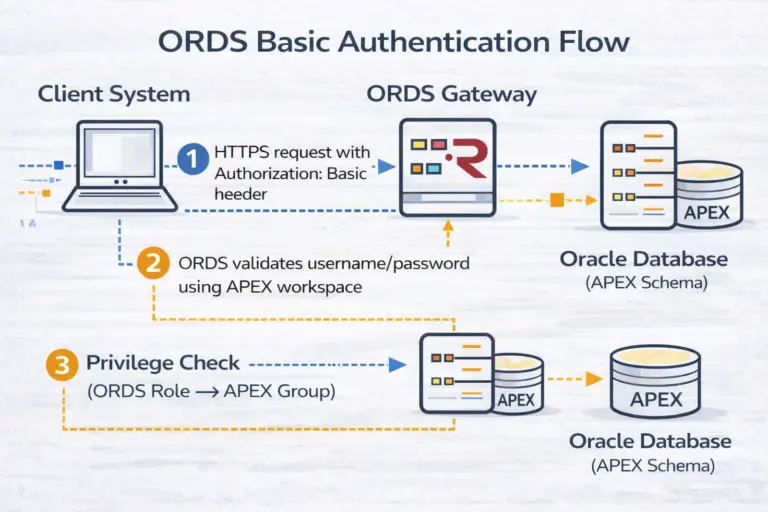
- How ORDS Basic Auth works behind the scenes
- How to create ORDS roles and privileges
- How to map URL patterns (e.g.,
/api/*) - How to create APEX groups that match ORDS roles
- How to create an APEX user for Basic Authentication
- How to test the API using cURL
- How to protect both GET and POST endpoints
ORDS Basic Authentication Flow (Diagram)
🏗️ Step 1 - Create the ORDS Module
We’ll create a module named demoapi ( everything is done via sqlplus or Oracle APEX SQL Workshop
BEGIN
  ords.create_module(
    p_module_name => 'demoapi',
    p_base_path   => '/demoapi/'
  );
END;
/
Create a simple GET endpoint:
BEGIN
  ords.define_template(
    p_module_name => 'demoapi',
    p_pattern     => 'hello'
  );

  ords.define_handler(
    p_module_name => 'demoapi',
    p_pattern     => 'hello',
    p_method      => 'GET',
    p_source_type => ords.source_type_collection_feed,
    p_source      => q'[
      select 'Hello from Basic Auth API' as message
      from dual
    ]'
  );
END;
/
Your API is now accessible at: https://example.com/ords/demoapi/hello
Right now it is public — we’ll secure it next.
🔒 Step 2 — Create ORDS Role & Privilege
BEGIN
  ords.create_role('DEMOBASIC_ROLE');
END;
/BEGIN
ords.create_privilege(
p_name => 'DEMOBASIC_PRIV',
p_label => 'Demo API Access',
p_description => 'Access to /demoapi/*',
p_role_name => 'DEMOBASIC_ROLE'
);
END;
/Map to the URL pattern:
BEGIN
  ords.create_privilege_mapping(
    p_privilege_name => 'DEMOBASIC_PRIV',
    p_pattern        => '/demoapi/*'
  );
END;
/
👥 Step 3 - Create the APEX Group
APEX group name must match the ORDS role:
DECLARE
  l_ws_id NUMBER;
BEGIN
  l_ws_id := apex_util.find_security_group_id('DEMO');
  apex_util.set_security_group_id(l_ws_id);

  apex_util.create_user_group(
    p_group_name => 'DEMOBASIC_ROLE',
    p_group_desc => 'Basic Auth Access for Demo API'
  );
END;
/
🚀 If you host in Revion’s APEX cloud, workspaces and metadata are pre-optimized for ORDS.
👤 Step 4 - Create APEX User for Basic Auth
DECLARE
  l_ws_id NUMBER;
  l_group NUMBER;
BEGIN
  l_ws_id := apex_util.find_security_group_id('DEMO');
  apex_util.set_security_group_id(l_ws_id);

  l_group := apex_util.get_group_id('DEMOBASIC_ROLE');

  apex_util.create_user(
    p_user_name      => 'demo_basic_user',
    p_web_password   => 'MySecretPass123!',
    p_email_address  => 'demo@example.com',
    p_default_schema => 'DEMO',
    p_group_ids      => l_group
  );
END;
/
🧪 Step 5 - Test the Secured API
Test without authentication:
curl -i https://example.com/ords/demoapi/hello
Expected:
HTTP/1.1 401 Unauthorized
Test with Basic Auth:
					curl -i \
  -u demo_basic_user:'MySecretPass123!' \
  https://example.com/ords/demoapi/hello
🧪 Step 6 - Optional POST Endpoint
BEGIN
  ords.define_template(
    p_module_name => 'demoapi',
    p_pattern     => 'submit'
  );

  ords.define_handler(
    p_module_name   => 'demoapi',
    p_pattern       => 'submit',
    p_method        => 'POST',
    p_mimes_allowed => 'application/json',
    p_source_type   => ords.source_type_plsql,
    p_source        => q'[
      begin
        htp.p('{"status":"received"}');
      end;
    ]'
  );
END;
/
🛡️ Security Best Practices
If you host with Revion, these best practices are enforced automatically:
- HTTPS termination with modern TLS
- APEX workspace hardening
- ORDS hardening baseline
- Cloud WAF configuration (AWS WAF / OCI WAF)
- IP reputation controls
- APEX admin access restrictions
- Automated failover & backups
Revion also manages ORDS deployments on:
🔹 OCI (Oracle Cloud Infrastructure)
https://revion.com/oci/
🔹 AWS Cloud
https://revion.com/aws/
🚀 Need Enterprise-Grade ORDS or APEX Hosting?
Revion provides the most reliable, secure, and optimized hosting for:
- Oracle APEX
- ORDS
- Oracle Database 19c / 23ai
- ARC / DR setups
- Multi-cloud environments (OCI or AWS)
- Managed performance tuning
- Enterprise SLAs
- 24×7 monitoring
👉 Oracle APEX Hosting
https://revion.com/oracle-apex-hosting/
👉 Managed OCI Services (APEX, ORDS, Databases)
https://revion.com/oci/
👉 Managed AWS Cloud for Enterprise Workloads
https://revion.com/aws/
Whether you’re deploying internal APIs, customer-facing services, or large-scale APEX systems, Revion handles everything from security to infrastructure so you can focus on development.